Mail to Print – Email Processing Issues: Use IMAP PULL Mode
If Gespage Mobile randomly stops processing new emails, it is important to check the configuration of the email profiles.
Within the email profiles, several protocols can be configured for retrieving messages, the most common being IMAP. Gespage offers two operating modes for this protocol:
IMAP PULL: This mode operates through polling, meaning the mail server is queried at regular intervals (60 seconds by default) to retrieve new messages. This interval is generally well supported by most email providers. In practice, IMAP PULL mode proves to be more stable and reliable for the Mail to Print feature.
IMAP PUSH: This mode enables an immediate connection to the mailbox whenever a new message arrives. However, many email providers do not support this type of real-time connection, which can lead to issues in email processing.
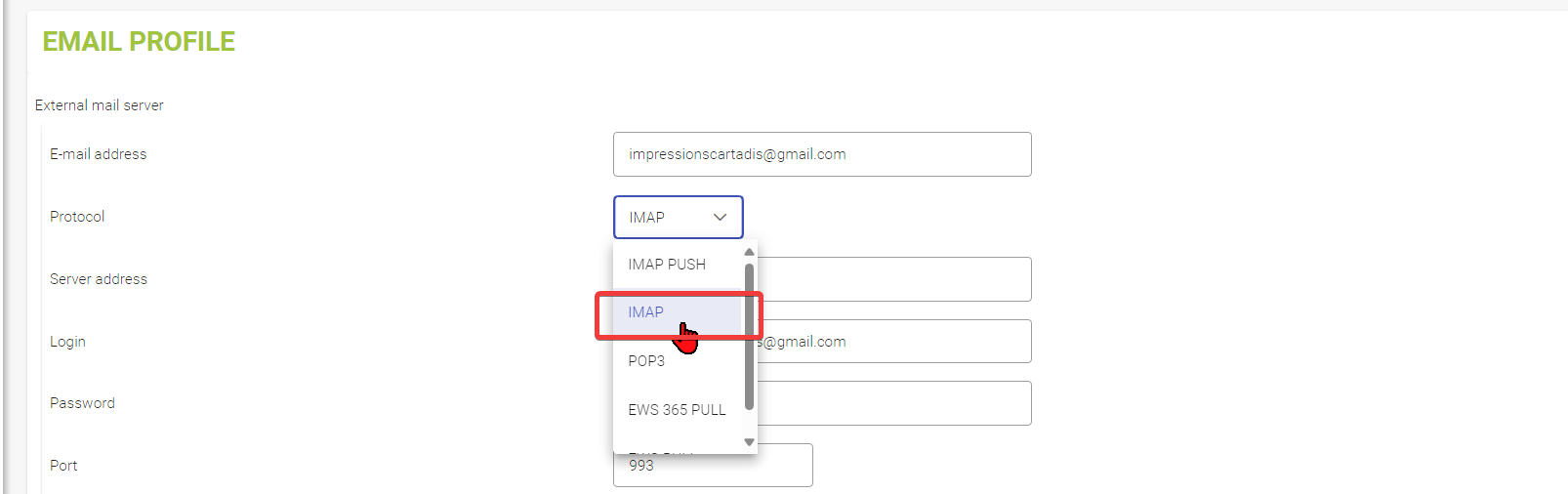
Recommendation:
In the event of malfunction or inconsistent email handling, it is recommended to use IMAP PULL mode to ensure greater stability and reliability of the service.
Was this article helpful?
That’s Great!
Thank you for your feedback
Sorry! We couldn't be helpful
Thank you for your feedback
Feedback sent
We appreciate your effort and will try to fix the article