Configuring the SMTP Server in Gespage
Description This menu allows you to configure the email sending parameters (SMTP) for your Gespage server. These settings are required to enable the server to send automated emails such as alerts, reports, and Scan-to-Email notifications. SMTP
parameters must be provided by the IT department of the installation site.
Access Path Server > Configuration > Email Server
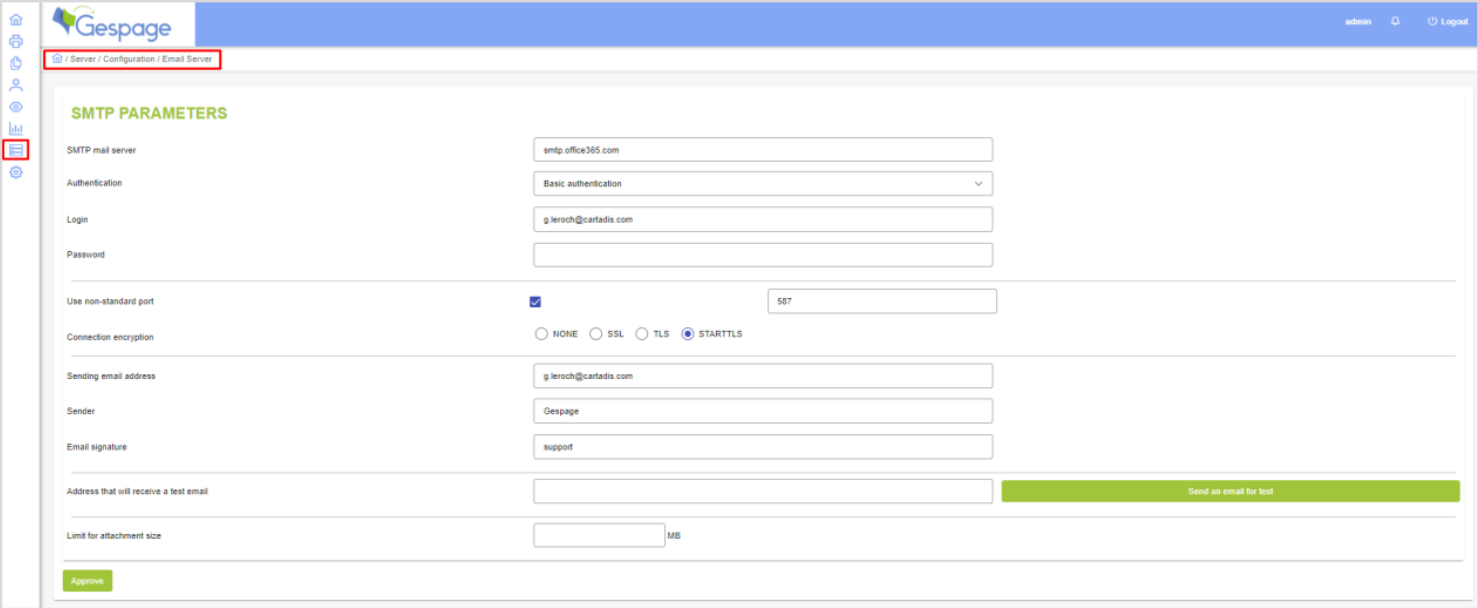
SMTP Parameters
SMTP mail server: Enter the IP address or the DNS name of your SMTP server.
Authentication: Select the authentication protocol required by your server: Anonymous, Basic authentication, or NTLM (for Exchange).
Login / Password: Enter the credentials required to access the SMTP server.
Important Note: In "Basic authentication" mode on a Windows SMTP server, the domain name must be added to the username (e.g., domain\user).
Use non-standard port: Check this box only if you are using a specific SMTP port other than the default port 25.
Connection encryption: Select the encryption type required by your server (SSL, TLS, or STARTTLS).
Sender Parameters
Sending email address: The email address used by the Gespage server to send messages. Depending on your server configuration, this may need to be a valid, existing mailbox.
Sender: The display name that will appear as the "From" name in the recipient's inbox.
Email signature: The text added automatically to the bottom of every email sent by the system.
Common Configuration Examples
Office 365
SMTP Server: smtp.office365.com
Authentication: Basic authentication
Port: 587 (Check "Use non-standard port")
Encryption: STARTTLS
Gmail
SMTP Server: smtp.gmail.com
Authentication: Basic authentication
Encryption: TLS
Testing and Technical Info
Connection Test: You can verify the settings by entering an email in the "Address that will receive a test email" field and clicking the test button.
Troubleshooting: If the delivery fails, specific error messages are recorded in the Event logs.
Was this article helpful?
That’s Great!
Thank you for your feedback
Sorry! We couldn't be helpful
Thank you for your feedback
Feedback sent
We appreciate your effort and will try to fix the article