Gespage v9.4 release notes
You will find below the version release notes and attached the release notes in PDF format.
TABLE DES MATIÈRES
- You will find below the version release notes and attached the release notes in PDF format.
- Version 9.4.3
- Version 9.4.2
- Version 9.4.1
- Version 9.4.0
Version 9.4.3
Released July 21th, 2026
Bug fixes and small enhancements
- eTerminals
- Lexmark eTerminal
- Improved copy quantity entry on the eTerminal.
- Enhanced management of OEM eTerminals (Sharp, Toshiba, and Xerox) when no Lexmark license is available. Automatic creation and overall eTerminal configuration have been improved.
- Delivery of a new package: GespageLexmark.fls version 7.2.1.1.
- Sharp eTerminal
- Improved quota management. A new parameter has been introduced for strict quota enforcement.
- When enabled, this parameter allows only one job at a time (Print or Copy).
- With this configuration (globally or on the eTerminal), negative balances for copy jobs and USB printing are prevented.
- Licensing
- Fix for Updates on Servers with an "Active (No Maintenance)" Status
- If the server remains on the same version, it continues to operate normally with the Active (No Maintenance) status.
- When a server with an Active (No Maintenance) status is upgraded to a higher version, the license is automatically switched to Limited Mode.
Reminder: "Active (No Maintenance)" means that the license maintenance period has expired.
- User Interface – Web Payment
- Worldline Payment
- Fixed Gespage account top-up processing in unit-based mode.
- Improved transaction management with more accurate tracking of transaction statuses and enhanced traceability in credit history.
Supported transaction statuses: CANCELED, REJECTED, CAPTURED (funds transferred to the merchant account), REFUNDED (refund processed on the merchant account, not within Gespage) - Improved payment workflow management on Stratus.
- Updated the transaction log onto the merchant portal. Added the transaction prefix defined in Gespage (displayed in the Merchant Ref. column).
- Added multilingual support for transaction receipt notification emails. All available langages on the server are supported.
- Reports
- Fixed the Print Volume by User report. The Department column now correctly displays the department name instead of the username.
- Added report generation in Excel (.xls) format, except for print workflow reports.
- Stratus – Mobile Printing
- eTerminal Configuration Improvements
- Epson: Default IPP protocol is now set to HTTPS.
- Konica Minolta and Sharp: Default IPP protocol is now set to IPPS.
- Toshiba: Please note that secure configuration requires assistance from our Customer Support team.
Version 9.4.2
Released April 22th, 2026
Bug fixes and small enhancements
- eTerminals
- Lexmark eTerminal
- New Lexmark eTerminal version (v7.2.1.0)
- From this GespageLexmark application version, when registering a new eTerminal on the server, the device brand is automatically initialized according ti the detected OEM brand.
- See dedicated eTerminal release notes for additional details.
- New Lexmark eTerminal version (v7.2.1.0)
- KM eTerminal
- Fix eTerminal installation when application is configured in Spanish.
- Fix eTerminal installation when application is configured in Spanish.
- Gespage Agent (Version 9.4.2.0)
- Printers management
- Global print2me: Fixed support for enforcing release rules at print release.
- Linux Agent: Fixed an issue where the printer queue name could be randomly corrupted.
- SNMP management
- Print jobs post-accounting: Improved support for Kyocera TASKalfa series.
- User interface
- Web Payment
- Wordline Web Payments
- Fixed support for 3D Secure payments across all browsers. Payments are now redirected to the Wordline payment page.
- Add support for admin notifications for each web payment.
This requires to setup a payment notification webhook to the server (see dedicated documentation for further details).
- Web payment order identifier
- Improved order prefix customization handling
- The order identifier is now available in the credit history details
- Wordline Web Payments
- Administration interface
- User directory synchronization
- Fixed an issue with the AD/LDAP credentials storage format introduced in version 9.4.1
- System
- Security
- JAVA RMI is now disabled by default.
- Installation
- Updated the default PostgreSQL installation path to reflect embedded version v15.14.
- Gespage Stratus
- Mobile printing
- A dedicated mobile print2me queue (Gespage_mobile_print2me) is now available by default to simplify mobile printing setup.
Upgrade information
- User directory synchronization
- If the user directory synchronization creedntials were modified in version 9.4.1, they must be re-saved to restore proper synchronization.
Version 9.4.1
Released March 4th, 2026
Bug fixes and small enhancements
- eTerminals
- Fujifilm eTerminal
- Added support for a card reader profil
- Fixed an intermittent issue that could prevent user sessions from terminating correctly.
- It is required to update the Fujifilm Gespage application with its new version.
- Sharp eterminal
- Fixed an issue preventing the use of Gespage Advances Scan (since 9.4.0).
- Fixed an issue preventing the use of Gespage Advances Scan (since 9.4.0).
- Ricoh eterminal
- Fixed support for the eTerminal custom language configuration.
- Xerox eterminal
- Improved support for eTerminal push with "Clean JBA log on push" option.
- Administration interface
- Printer and agent management
- Added support for deleting multiple printers
- Added support for deleting one or mutiple agents
- Added auto-completion when assigning a printer queue to a printer.
- Added support for deleting multiple printers
- User and department management
- Directory synchronization: Fixed an issue where the credentials password could be cleared when editing the configuration.
- Department CSV Import: Added support for importing department color balance via CSV.
- Reports
- Cost and volume reports : Added a printer group column to the CSV reports.
- Cost and volume reports : Added a printer group column to the CSV reports.
- User interface
- SSO Login
- CAS SSO Server: Added support for dynamic user account creation at first CAS authentification.
- CAS SSO Server: Added support for dynamic user account creation at first CAS authentification.
- Web Payment
- Resolved missing information in the user credit history
- Fixed an error occuring when the user email is empty
- Mobile printing
- Added support for PDF files embedding JPEG 2000 images.
- Fixed a potential orientation issue when printing some documents.
- Gespage Agent (Version 9.4.1.0)
- Printer's management
- Gespage Direct Agent : Improved assignment of printer queues to priority printers
- Uncontrolled printers : Fixed an issue where the agent could modify advanced settings from uncontrolled printers.
- SNMP management
- Counters monitoring: Improved support for Fuji Apeos series.
- Print jobs post-accounting: Improved support for Brother MFC Series.
- Miscellaneous
- Copy shop mode
- Fixed support for copy shop mode on documens printed in American paper format.
- Fixed support for copy shop mode on documens printed in American paper format.
- Performance (large-scale installations)
- Fixed performance issues when no mobile printing configuration is set.
- Improved dashboard loading time.
- Language
- Added support for German translation in the user interface.
- Added support for German translation in the user interface.
- Gespage Stratus - Stratus-only features
- Mobile printer's configuration
- Added a new menu to manage mobile printers (edit and delete).
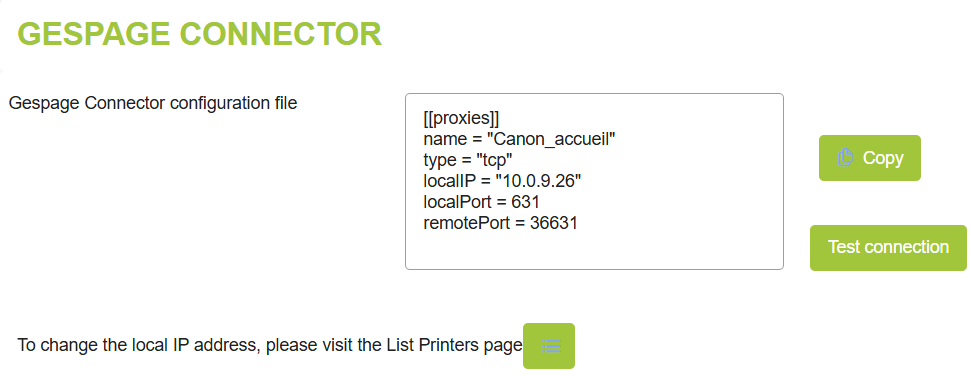
- Mobile printer connector configuration is now displayed fr easy copy/paste and connection testing.
Limitations
- Wordline Web Payments
- 3D Secure payment configuration is currently not supported on Chrome or mobile browsers.
- It is not yet possible to receive admin notifications for Wordline web payment.
Version 9.4.0
Released December 31th, 2025
New features
- eTerminals
- New Fujifilm eTerminal
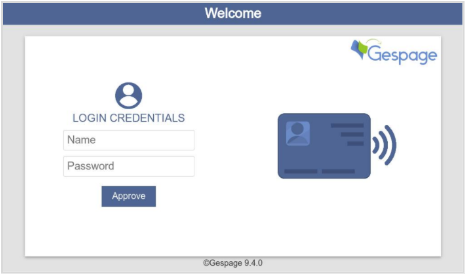
- Login screen supporting card and keyboard login modes (print code, username and password or username).
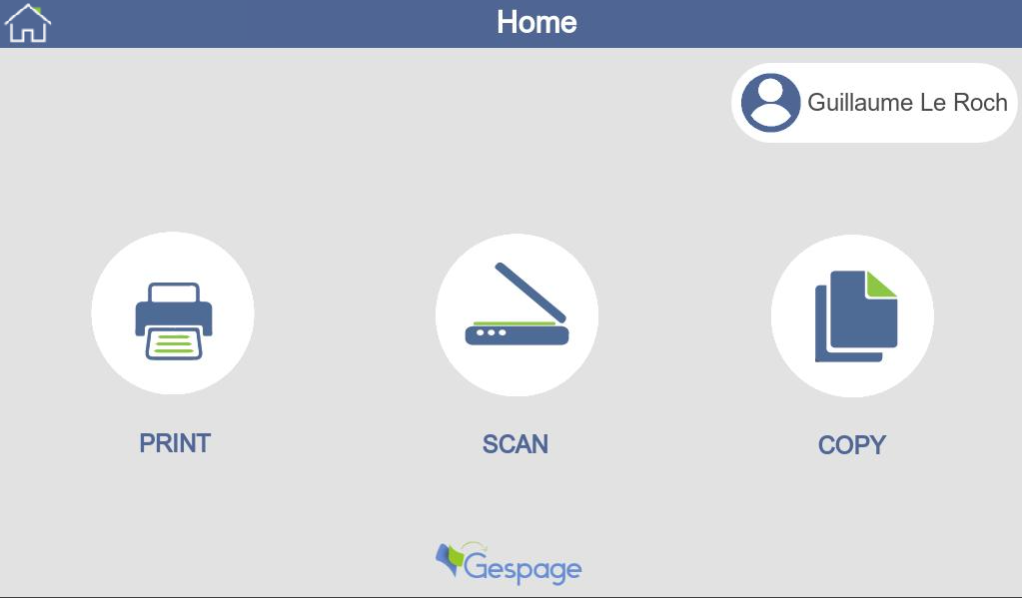
- Gespage home menu for quick access to core functions: PRINT, SCAN and COPY, and HOME menu
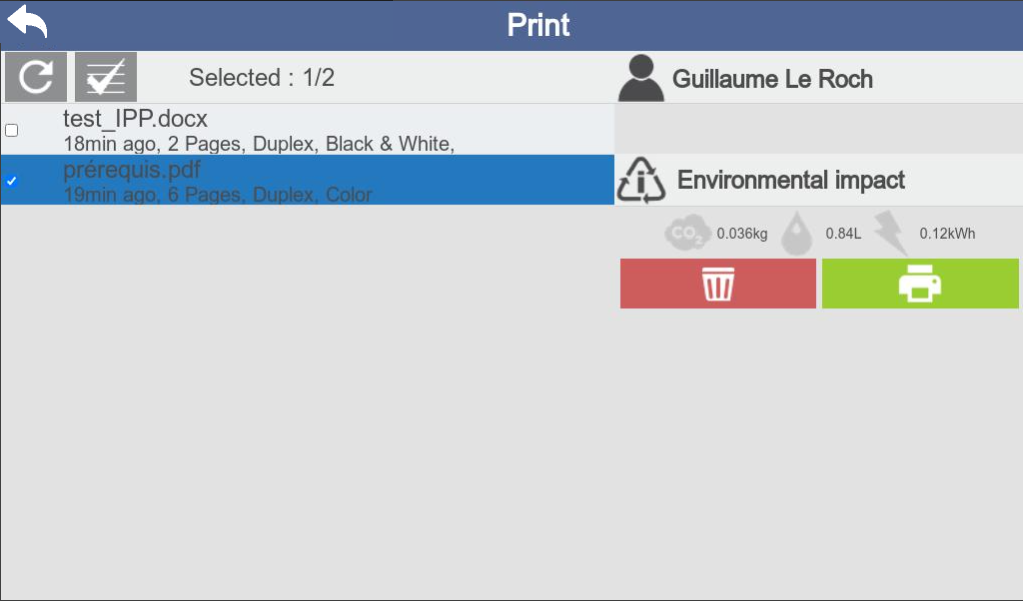
- Print release page with environmental information
- Scan2me feature provided through the Fujifilm scan-to-email menu, with the user’s email prefilled.
- The eTerminal installation procedure is available in the Fujifilm eTerminal manual.
- Login screen supporting card and keyboard login modes (print code, username and password or username).
- eTerminal Toshiba
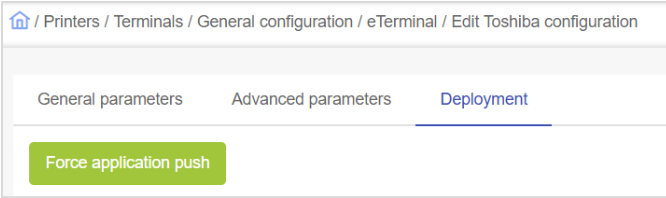
- Added support for simultaneous deployment across all Toshiba eTerminals
- It is now possible to force the deployment of the Gespage eTerminal to all Toshiba MFPs configured in Gespage using the ‘Force application push’ button.
- This is especially useful when migrating from Gespage v8.
- Added support for simultaneous deployment across all Toshiba eTerminals
- Printing
(Agent Gespage v9.4.0.0 - Parseur Gespage v9.4.0.0)
- Added support for Windows Protected Print (WPP)
- WPP is a Microsoft printing security framework designed to restrict printing to IPP-based, sandboxed print drivers only.
- With Microsoft Windows 11, legacy v3/v4 print drivers are progressively deprecated with full enforcement planned by 2027, when non-WPP-compliant drivers will no longer be supported.
- Added support for PDF spool formats on Windows server.
- Improved compatibility with Microsoft IPP Class Driver
Bug fixes and small enhancements
- eTerminals
- Canon eTerminal (v1.2.2)
- Various enhancements to the Gespage scan feature
- See dedicated eTerminal release notes for further details.
- Kyocera eTerminal (v1.7.6.1)
- See dedicated eTerminal release notes for further details.
- Lexmark eTerminal
- New Lexmark eTerminal version (v7.1.4.3)
- See dedicated eTerminal release notes for details.
The Lexmark eTerminal installed on an OEM MFP can now use the corresponding OEM brand eTerminal license (Sharp, Toshiba, or Xerox).
The license is selected based on the brand configured in the eTerminal settings.
- New Lexmark eTerminal version (v7.1.4.3)
- Sharp eTerminal
- Fixed an issue preventing the Sharp eTerminal from entering sleep mode.
- Fix an issue causing incorrect B&W enforcement when using post-accounting on Sharp eTerminal (requires Gespage Agent v9.4.0.0).
- Toshiba eTerminal
- Clarified the ‘Auto clear’ parameter in the eTerminal general configuration
- Xerox eTerminal
- Fixed an intermittent issue where the Print release button was truncated.
- User interface
- Web user interface improvements
- In the printing form, the previously used printer is now selected by default
- Improved visibility of the user balance for limited users in the page header
- An error message is now displayed when a print job is submitted with an insufficient balance. This message appears only when web payment is enabled.
- The “Delete” button for pending print jobs is now always displayed
- Web Payment
- Worldline Web Payments
- Fix support for Worldline transaction when 3D Secure is activated.
- Fix support for long secret keys.
- Web payment order identifier
- The order prefix can now be customized, including dynamic parameters such as user identifier or department.
- Worldline Web Payments
- Mobile printing
- Mobile printing document management
- Fix support for Black & White mobile job submission on some printer models on Linux server.
- Fix support for Black & White mobile job submission on some printer models on Linux server.
- Printing
- Printing rules
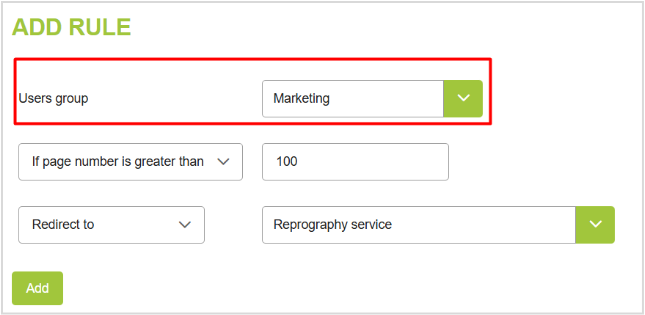
- Printing rules can now be restricted to specific user groups.
- Printing rules can now be restricted to specific user groups.
- Gespage Agent (v9.4.0.0)
- Fix support for Gespage watermark on documents printed in American paper format.
- Fix support for Gespage watermark on documents printed in American paper format.
- Gespage Advanced Scan
- Scan to SharePoint: Fixed support issues in some countries
- Server
- Data anonymization after a period
- User information can now be automatically anonymized after a configurable retention period, improving GDPR compliance and privacy practices
- Notification task
- Added the %CREDIT_COLOR% metacharacter to include the user’s color balance in notification emails.
- Database archiving
- Fixed an issue in the Gespage database archiving process
- User Directory Synchronization
- Improve Entra ID synchronization for large user directories .
- Fixed Entra ID synchronization issues when multiple directories are configured.
- System
- Technical stack upgrades
- Updated embedded database to PostgreSQL v15.14.
- Installation
- Resolved potential errors during Gespage server upgrade or migration from older versions.
- Improved the configuration of Gespage services recovery settings
- Gespage logs
- On Linux server, the server logs are now located under GespageCore/server/logs.
- Gespage Stratus – Stratus-only features
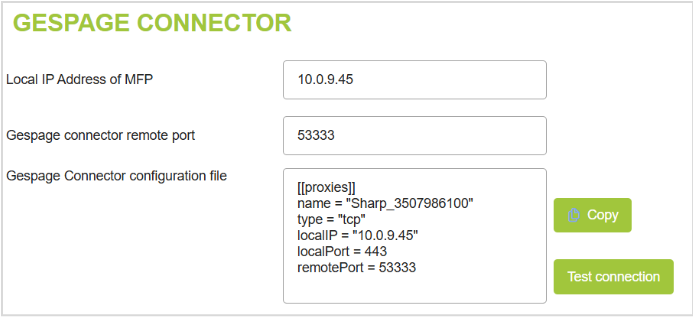
- Gespage Connector configuration improvements
- On eTerminals requiring a Gespage Connector configuration, the connector file configuration linked to the MFP is now displayed for easy copy and paste.
- A Test connection button is available to verify the connection once the connector setup is complete.
Limitations
- Fujifilm eTerminal
- Only Cartadis card readers are supported.
- MFP functions: Accounting and access rights for copies and scans are not available yet.
- Print release: Print release options cannot be modified from the eTerminal release menu.
- PDF spool file support
- On Windows server, it is not yet possible to modify or enforce print release options on PDF spool files.
Was this article helpful?
That’s Great!
Thank you for your feedback
Sorry! We couldn't be helpful
Thank you for your feedback
Feedback sent
We appreciate your effort and will try to fix the article