Google Cloud Drive: scan configuration
Prerequisite:
Gespage must be version 9.3.0 or higher.
Users account must be synchronized through Google Directory:
Access right for Google Drive must be enable at the APIs level.
To allow the Google Drive management:
- https://www.googleapis.com/auth/drive
- https://www.googleapis.com/auth/drive.file
- https://www.googleapis.com/auth/drive.metadata.readonly
Gespage outgoing creation
Then, you must create an outgoing profile, and link it to a Gespage advanced scan profile.
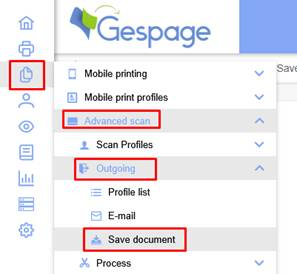
Add an outgoing profile to save documents:
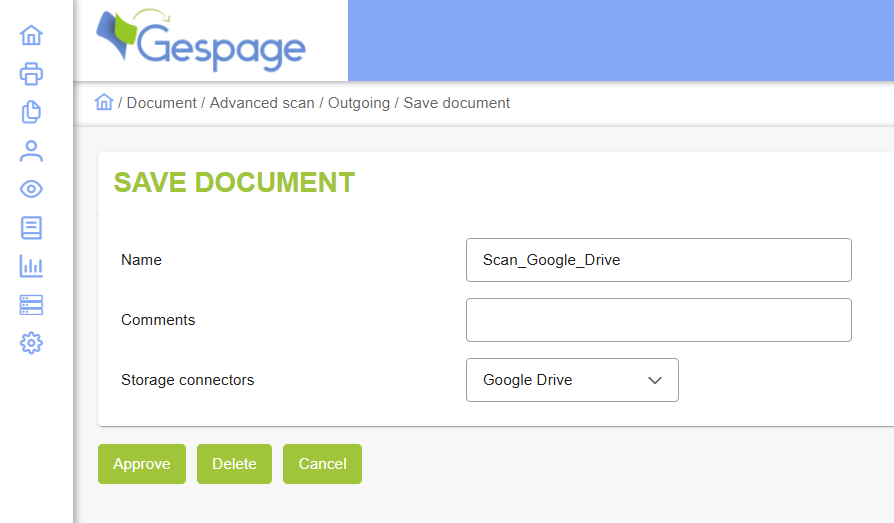
Define the storage connector to Google Drive:
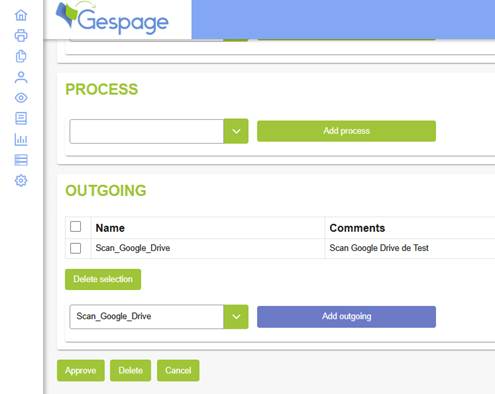
Then, create an advanced scan profile for the user group you want (Default group contain all users) and define the outgoing flow to the one you create previously:
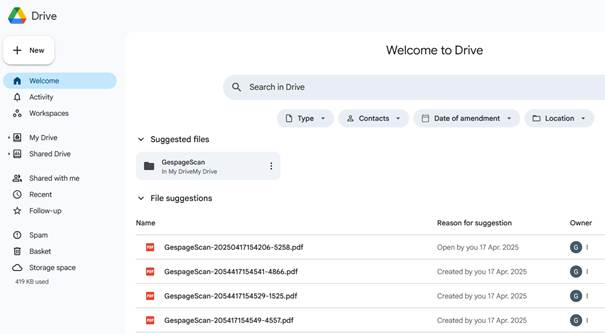
Your user can now use this scan flow, and will be able to get the scan in their Google Drive office account, under the directory GespageScan:
Was this article helpful?
That’s Great!
Thank you for your feedback
Sorry! We couldn't be helpful
Thank you for your feedback
Feedback sent
We appreciate your effort and will try to fix the article